
Summary Dynamics 365 Contact Center is introducing new real-time streaming experiences in production ready public preview for supervisors. An event-driven foundation that gives every supervisor live operational truth—so they can monitor the floor, detect issues as they emerge, and act in the moment.
Real-time visibility is critical for customer experience leadership to identify issues early, make informed decisions, and act with confidence. In a June 2026 Dynamics 365 blog, Microsoft shared our agentic vision for the contact center, where purpose-built agents work together to help each contact center persona achieve their goals.
Building on that vision, we recently refreshed the supervisor experience for the modern contact center. The new workspace will bring key supervisor capabilities together in one place, spanning real-time streaming analytics, monitoring, diagnostics, and operations, helping supervisors move from insight to action.
And this is just the beginning. We’re extending the same persona-first approach to deliver purpose-built experiences for contact center representatives and administrators, creating a more connected and intelligent experience across the contact center.
Dynamics 365 Contact Center is introducing new real-time streaming experiences in production ready public preview for supervisors, including enhanced wallboards and interactive analytics that give supervisors live visibility into contact center performance and help them quickly identify and respond to issues.1
Historical analytics remain essential for understanding trends, evaluating performance, and planning for what comes next. But supervisors also need a live view of what is happening now so they can respond as conditions change. A contact center supervisor’s day often runs on three priorities: monitor what is happening across queues and representatives, detect the moments that need attention, and act before something causes severe end customer impact.
- Monitor the floor through a live wallboard showing demand, backlog, service levels, and workforce availability.
- Detect the metric, queue, or conversation that needs attention through interactive service, queue, and conversation-level analytics.
- Act where the insight appears by updating queues, changing representative presence, assigning or transferring conversations, or closing items when appropriate.
Consider Alexandra2, a supervisor overseeing billing and general support during a busy afternoon. Historical analytics help her understand patterns and plan. Real-time analytics in Dynamics 365 Contact Center can help her see what is changing right now, identify where attention is needed, and take action.
Monitor: See the whole floor, live
During Alexandra’s afternoon shift, a demand spike sends active conversations and backlog climbing. The wallboard makes the change immediately visible, helping the team align on what needs attention.
The updated wallboard provides an at-a-glance view of contact center health, including demand, backlog, service levels, wait times, and workforce availability across representatives and self-service agents.
Real-time streaming analytics in Dynamics 365 Contact Center distinguishes live metrics, such as active conversations and backlog, from aggregated metrics, such as service level and abandon rate, so supervisors can quickly understand both the current state and performance over time.
- Live metrics show the current operating state, such as active conversations, queue backlog, online representatives, and longest wait time.
Aggregated metrics summarize performance over a selected period, such as service level, abandon rate, and average speed to answer.

Detect: Find the moments that need attention
Within the new real-time analytics dashboards, the assisted service view helps supervisors investigate what’s behind a change in performance. They can filter by period, channel, and queue; review performance funnels; and open metric details to understand definitions, calculation methodology, thresholds (normal, at risk, critical), a trendline showing whether it’s improving or deteriorating.
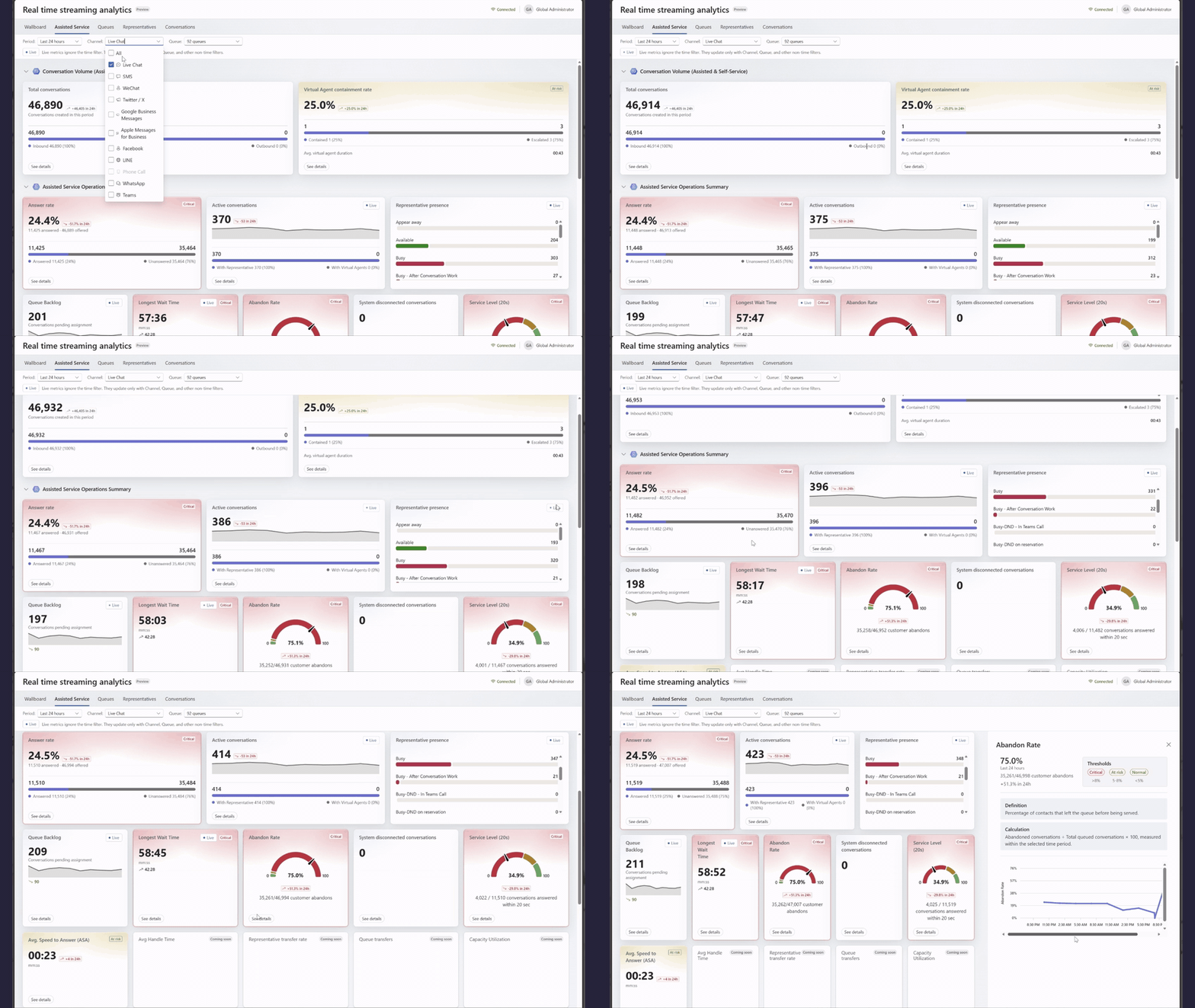
The queues view then narrows the focus to where pressure is building. Queue backlog, longest wait time, service level, abandon rate, average speed to answer, representative availability, transfers, overflows, and callbacks can all be reviewed at the queue level.
Thresholds help supervisors move from scanning to prioritizing. Metrics carry predefined thresholds with clear visual indicators, so supervisors do not scan numbers looking for outliers—the outliers announce themselves.
| Status | What it means | How you’ll see it |
| Normal | Metric is within the expected range | Default display |
| At risk | Metric is approaching critical levels | Amber background with “At risk” tag |
| Critical | Metric is outside acceptable thresholds | Red background with “Critical” tag |
For Alexandra, the assisted service view confirms that abandon rate is deteriorating, while the queues view shows the pressure is concentrated in Premium Support. Instead of guessing, she can see where to intervene.

Act: Resolve where insight appears
In the new analytics dashboard, the contact center representatives’ view turns visibility into action. Supervisors can review representative availability, answered-versus-offered assignments, unanswered assignments, active conversations, presence duration, and capacity (for example, 6/15 capacity units). This makes it easier to quickly identify overloaded representatives or low answer rates and respond in the moment. Additionally, from the representatives view, a supervisor can:
- Update queues. Select one or more representatives and assign, modify, or remove queue memberships, rebalancing capacity toward the queues under pressure. This is where moving representatives across queues happens.
- Update presence. Select one or more representatives and set a new presence state to change how work is routed to them. This matters when a representative’s displayed availability no longer reflects their actual ability to take work. For example, after a missed status change or an operational disruption, supervisors can correct it immediately to prevent misrouting, restore available capacity, and reduce unanswered assignments and wait times.
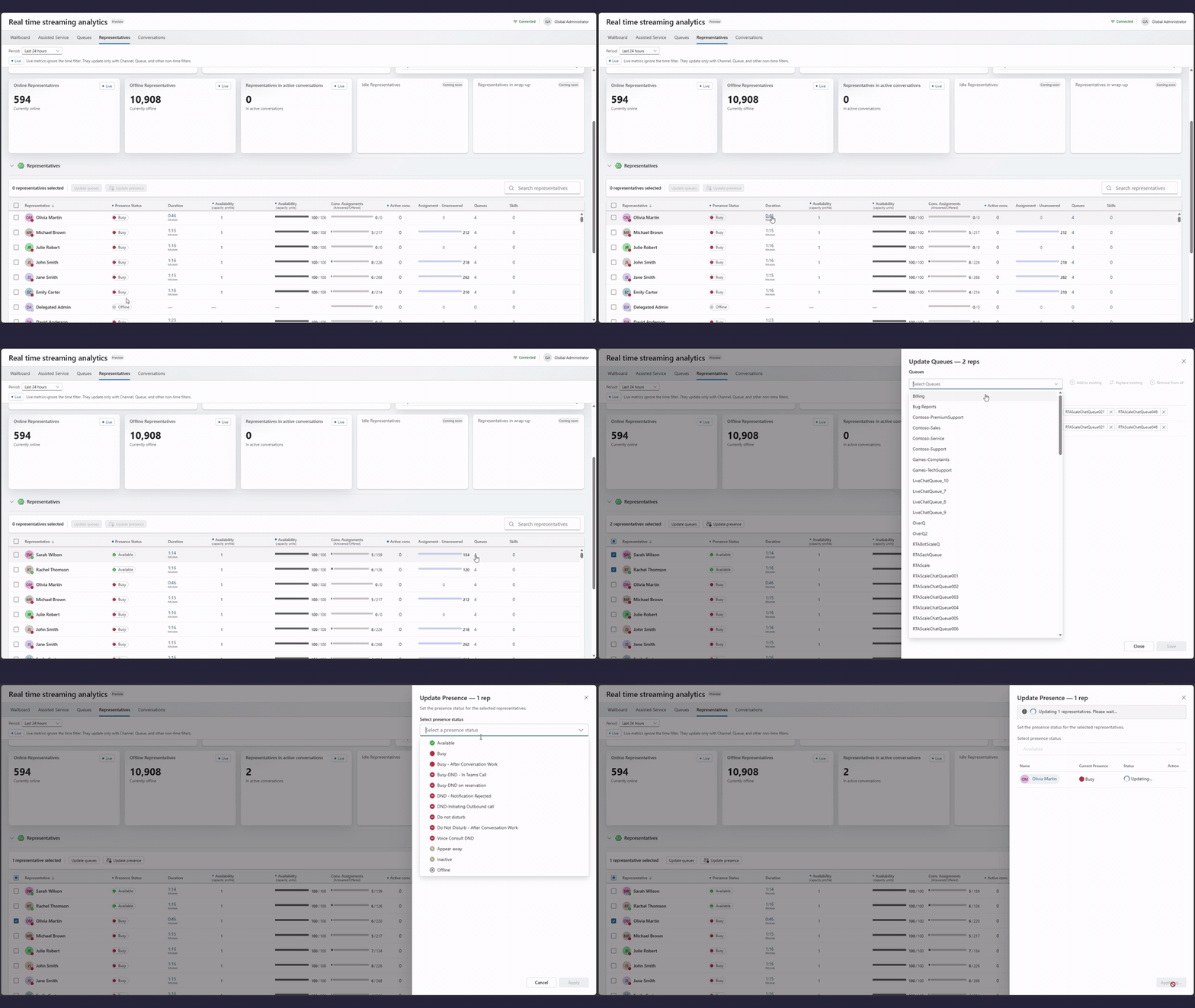
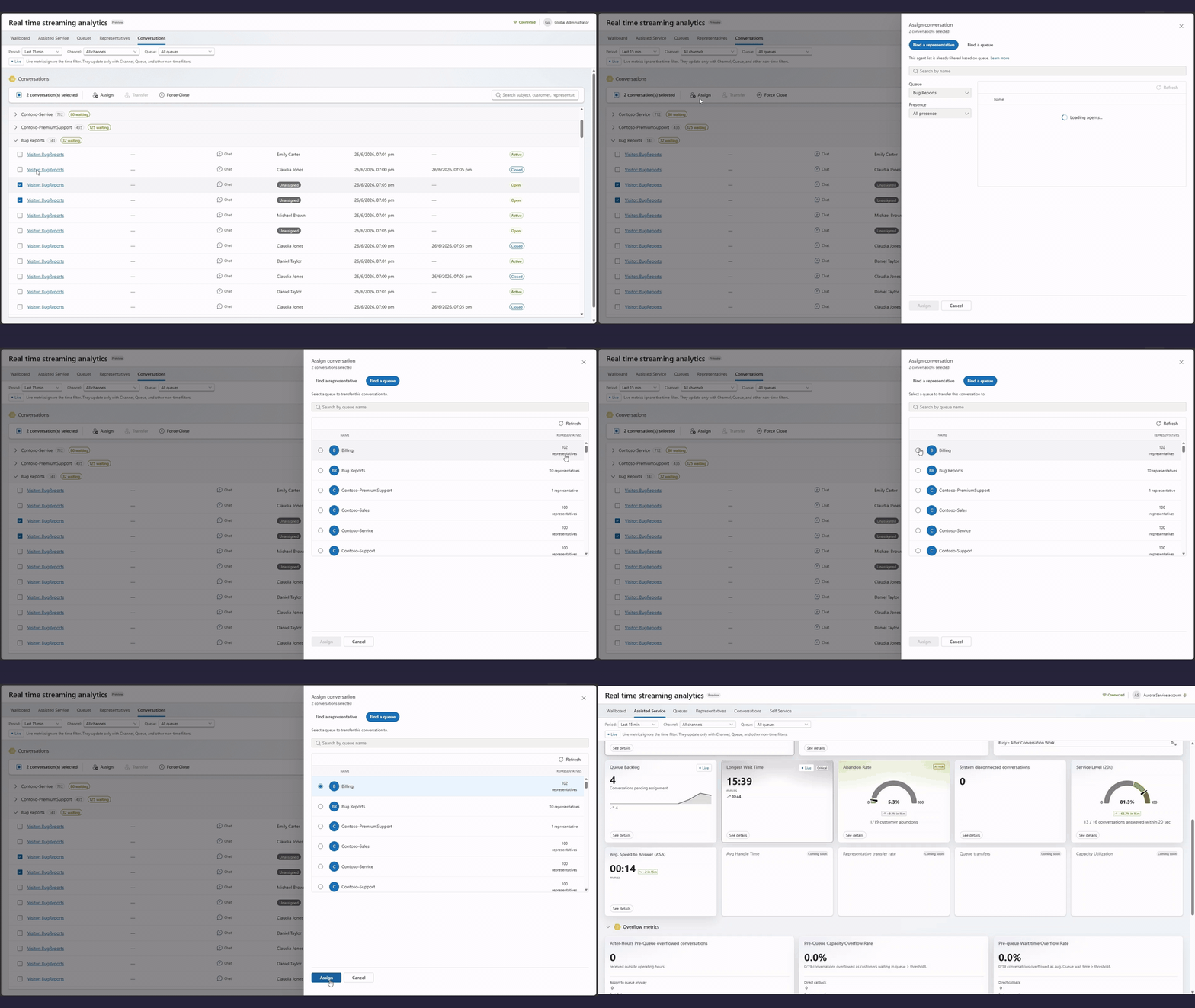
The conversations view adds the live interaction layer. Supervisors can review ongoing, queued, and completed conversations by queue, then take action on selected conversations from the bulk toolbar. They can assign, transfer, or force close conversations when operational conditions require direct intervention.
For Alexandra, this means she can add cross-trained representatives to the pressured queue and assign open conversations to the right queue or representative before the issue becomes an escalation—all without leaving the page.
How real-time analytics can help supervisors respond faster
Real-time streaming analytics in Dynamics 365 Contact Center reduces the distance between signal and action, so teams can respond while the customer experience is still unfolding.
- Supervisors can respond faster to queue pressure before it becomes a service-level issue.
- Teams can rebalance capacity with less context switching and fewer handoffs.
- Staffing decisions can be based on current demand signals rather than delayed reports.
- The broader team can align around the same live view of operational truth.
The result is a more connected way to manage modern customer experience operations, especially as supervisors oversee service representatives, self-service agents, and real-time operational workflows.
Get started with real-time streaming analytics
To use real-time streaming analytics, configure Omnichannel for Dynamics 365 Contact Center with active customer interaction channels, and ensure users have the Omnichannel Supervisor role to view dashboards and take action.
Learn more
1Responsible use.
This feature is intended to help customer service managers or supervisors enhance their team’s performance and improve customer satisfaction. It isn’t intended to be used, and shouldn’t be used, to make decisions that affect the employment of an employee or group of employees, including compensation, rewards, seniority, or other rights or entitlements.
Customers are solely responsible for using Dynamics 365, this feature, and any associated feature or service in compliance with all applicable laws, including laws that are related to accessing individual employee analytics, and monitoring, recording, and storing communications with users.
As part of this compliance, customers must adequately notify users that their communications with customer service representatives (service representatives or representatives) might be monitored, recorded, or stored.
As required by applicable laws, customers must also obtain consent from users before they use this feature with them. In addition, customers are encouraged to have a mechanism in place to inform their service representatives that their communications with users might be monitored, recorded, or stored.
Note:
• This is a production-ready preview feature.
• Production-ready previews are subject to supplemental terms of use.
2Disclaimer: Alexandra, the supervisor persona, is for illustration only and is fictitious. No real association is intended or inferred.